Shooting, finally connected
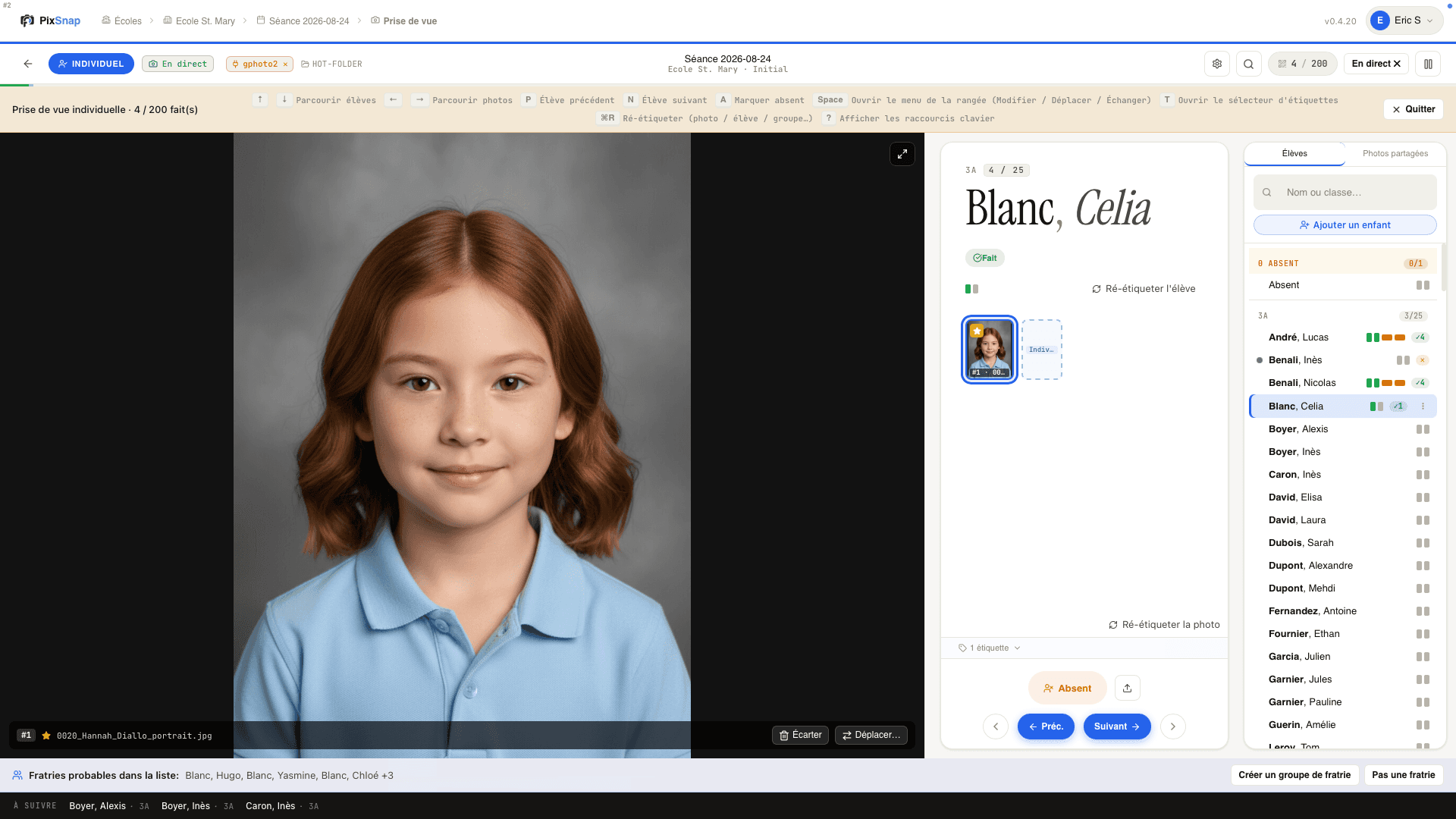
PixSnap connects your camera and automatically organizes student portraits in real time without interrupting the pace of the photo shoot. Hours of work reduced to just a few clicks. The school photo directory is generated instantly and can be handed over to the teachers as soon as the session ends.
Shooting, finally connected
PixSnap connects your camera and automatically organizes student portraits in real time without interrupting the pace of the photo shoot. Hours of work reduced to just a few clicks. The school photo directory is generated instantly and can be handed over to the teachers as soon as the session ends.
Shooting, finally connected
PixSnap connects your camera and automatically organizes student portraits in real time without interrupting the pace of the photo shoot. Hours of work reduced to just a few clicks. The school photo directory is generated instantly and can be handed over to the teachers as soon as the session ends.
Advanced features
Compatible with Pronote and Charlemagne.
Cross-platform
Works on Windows, Apple, and Linux.
Compatible with all major tethering software and camera models
Offline operation possible during the shooting session.
Cross-platform
Works on Windows, Apple, and Linux.
Compatible with all major tethering software and camera models
Offline operation possible during the shooting session.
Cross-platform
Works on Windows, Apple, and Linux.
Compatible with all major tethering software and camera models
Offline operation possible during the shooting session.
Shooting presets
Number and orientation of photos for each type of pose, without handling or additional sorting.
Default template, adjustable for each establishment.
Shooting presets
Number and orientation of photos for each type of pose, without handling or additional sorting.
Default template, adjustable for each establishment.
Shooting presets
Number and orientation of photos for each type of pose, without handling or additional sorting.
Default template, adjustable for each establishment.
Multiple poses, a single session
Management of multiple poses per child, according to the photographer's workflow.
Absence tracking.
Management of siblings and linking of the photo to each student concerned, with a quick search by name.
Switch classes in a second, using "drag and drop."
Multiple poses, a single session
Management of multiple poses per child, according to the photographer's workflow.
Absence tracking.
Management of siblings and linking of the photo to each student concerned, with a quick search by name.
Switch classes in a second, using "drag and drop."
Multiple poses, a single session
Management of multiple poses per child, according to the photographer's workflow.
Absence tracking.
Management of siblings and linking of the photo to each student concerned, with a quick search by name.
Switch classes in a second, using "drag and drop."
Immediate upload to your PixFirst gallery
PixFirst unified account. Log in with the same credentials.
Files organized and named for import into the gallery.
Correct application of tags (Group vs. Fun Group, Individual vs. Vertical Individual...).
Instant generation of the photo directory in PDF format directly from PixSnap.
Immediate upload to your PixFirst gallery
PixFirst unified account. Log in with the same credentials.
Files organized and named for import into the gallery.
Correct application of tags (Group vs. Fun Group, Individual vs. Vertical Individual...).
Instant generation of the photo directory in PDF format directly from PixSnap.
Immediate upload to your PixFirst gallery
PixFirst unified account. Log in with the same credentials.
Files organized and named for import into the gallery.
Correct application of tags (Group vs. Fun Group, Individual vs. Vertical Individual...).
Instant generation of the photo directory in PDF format directly from PixSnap.
Benefits
Zero rekeying, zero manual sorting, zero misplaced files.
No paper steps, no barcodes to scan between each student.
Full compatibility with the hardware you already own.
The student directory is delivered immediately to the school at the end of the session.

PixFirst
All-in-one platform for school, nursery, and sports club photographers.
Sign up to follow the latest PixFirst news
© 2026 PixFirst | All Rights Reserved
PixFirst
All-in-one platform for school, nursery, and sports club photographers.
Sign up to follow the latest PixFirst news
© 2026 PixFirst | All Rights Reserved